Hands-on Course
The Hands-on Course teaches HAMi from the problem up. You follow a small AI team that starts with one GPU and runs into one problem after another: a small model takes a whole card, shared cards let models fight over memory and compute, and a growing cluster needs scheduling, monitoring, and quotas. Each chapter lets you see the problem first, then explains the principle behind it, then shows how HAMi solves it.
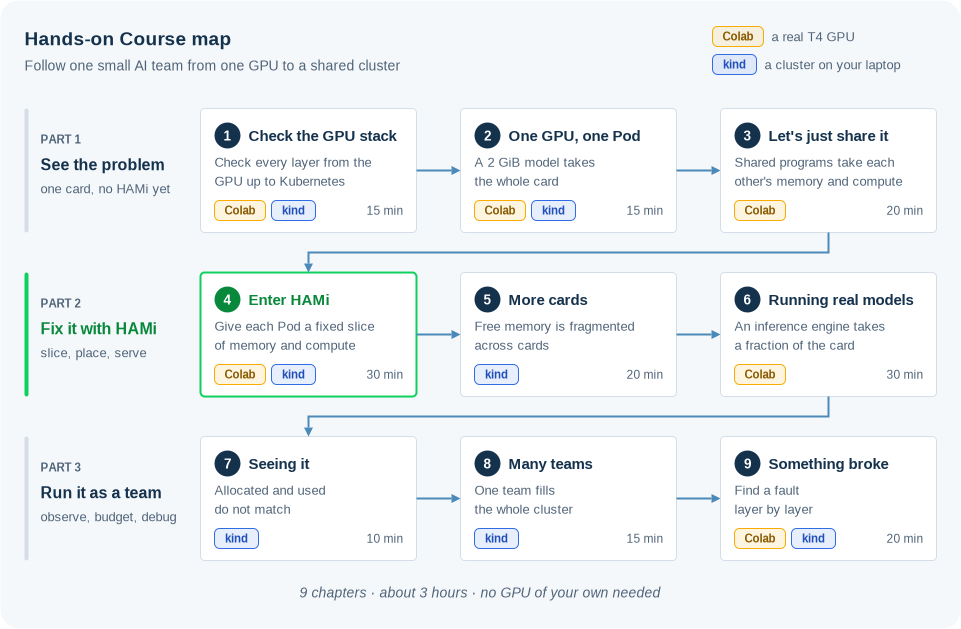
Where It Runs
Every chapter uses one or both of two environments. Neither needs a GPU of your own.
| Environment | What it is good for | What you need |
|---|---|---|
| Google Colab | What happens on one real GPU: memory, compute, and HAMi-core's limits | A Google account and a browser. Colab gives you a free NVIDIA T4. |
| kind on your laptop | What happens in a cluster: the HAMi webhook, scheduler, and policies | Docker, kind, kubectl, and helm, see Install the lab tools |
Every step that you run starts with a colored line that says where it runs. Commands for Colab are notebook cells and start with ! or %%. Commands for kind run in a terminal on your laptop.
Colab has no Kubernetes, and kind has no real GPU. In Colab you play the part of HAMi's device plugin and hand the limits to a program yourself. In kind you watch the scheduler make the same decision for a Pod.
Chapters
| Chapter | The problem | Runs on | Time |
|---|---|---|---|
| 1. Check the GPU Stack Layer by Layer | Check that every layer from the GPU to Kubernetes works | Colab, kind | 15 min |
| 2. One GPU, One Pod | A 2 GiB model takes the whole card | Colab, kind | 15 min |
| 3. Let's Just Share It | Shared programs take each other's memory and compute | Colab | 20 min |
| 4. Enter HAMi | Give each Pod a fixed slice of memory and compute | Colab, kind | 30 min |
| 5. More Cards, Where to Put Them | Free memory is fragmented across cards | kind | 20 min |
| 6. Running Real Models | An inference engine takes a fraction of the card | Colab | 30 min |
| 7. Seeing It | Allocated and used do not match | kind | 10 min |
| 8. Many Teams, One Cluster | One team fills the cluster | kind | 15 min |
| 9. Something Broke | Find a fault layer by layer | Colab, kind | 20 min |
How a Chapter Is Built
Every chapter follows the same order: the scenario, what you will understand, the problem shown first, the principle behind it, the steps with real output, a table of evidence, common pitfalls, a few checkpoint questions, and the state the next chapter expects. Every output on these pages comes from a real run, with the versions and date stated at the top of each chapter.
For background, read the Concepts pages on the HAMi website.