Chapter 2: One GPU, One Pod
Scenario
The GPU works at every layer, but Kubernetes does not know it exists. The team's first model is small: it needs 2 GiB of GPU memory. A second model of the same size is next in line. They expect both to fit on one 15 GiB T4 with plenty of room to spare.
What You'll Understand
- How a device plugin turns a GPU into a Kubernetes resource
- Why
nvidia.com/gpuis counted in whole cards - Why a 2 GiB model ends up holding a whole 15 GiB card
- Why Kubernetes refuses a request for half a GPU
Environment
This chapter takes about 15 minutes. Steps 1 and 2 run on Google Colab with the free T4 GPU. Steps 3 to 6 run in the kind cluster hami-course from Chapter 1.
| Component | Version |
|---|---|
| GPU | Tesla T4, 15360 MiB |
| NVIDIA driver | 580.82.07 (CUDA 13.0) |
| PyTorch | 2.14.1+cu130 |
| kind (Steps 3 to 6) | 0.33.0, Kubernetes v1.37.0 |
Verified on Colab on 2026-11-19. Steps 3 to 6 verified on 2026-11-18.
The Principle: How a GPU Becomes a Kubernetes Resource
The kubelet knows CPU and memory by itself. For anything else, it relies on a device plugin, a small program on the node that tells it which devices exist:
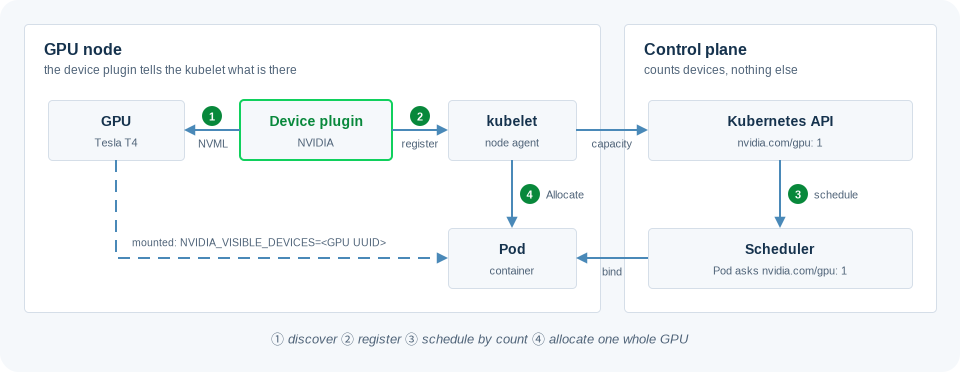
- Discover. The NVIDIA device plugin asks NVML which GPUs the node has and gets one ID per GPU.
- Register. It registers the resource name
nvidia.com/gpuwith the kubelet and lists the device IDs. The kubelet reports their number in the node's capacity. - Schedule. A Pod asks for
nvidia.com/gpu: 1. The scheduler compares that number with what is left on each node, and nothing else. - Allocate. When the kubelet starts the container, it asks the device plugin which device to use. The device plugin answers with the GPU's ID in
NVIDIA_VISIBLE_DEVICES, and the container runtime from Chapter 1 mounts that GPU into the container.
Kubernetes treats nvidia.com/gpu as an extended resource. Extended resources are counted in whole numbers and cannot be overcommitted. One device is one GPU, so a Pod gets a whole card or nothing. The full path is described in Device Plugin and DRA.
Step 1: What the Device Plugin Finds
Runs on Colab
The device plugin discovers GPUs through NVML, the same library nvidia-smi uses. List the GPUs the way it sees them:
!nvidia-smi -L
GPU 0: Tesla T4 (UUID: GPU-f90d8509-a883-06d3-0455-f918b7fcd4e6)
One GPU with one UUID. A device plugin on this machine would register one nvidia.com/gpu device with this ID. Its memory, its compute, and its model are not part of what the kubelet counts.
Step 2: One Model on the Card
Runs on Colab
Load the team's first model. The same small script stands in for it in every chapter: it loads a given amount of weights into GPU memory and then waits, the way an inference server holds its model.
%%writefile /content/model.py
import sys, time, torch
name, gib = sys.argv[1], float(sys.argv[2])
free, total = torch.cuda.mem_get_info()
print(f"{name} sees {total / 2**20:.0f} MiB of GPU memory", flush=True)
weights = torch.empty(int(gib * 2**30), dtype=torch.uint8, device="cuda")
print(f"{name} loaded {gib:g} GiB of weights on {torch.cuda.get_device_name(0)}", flush=True)
time.sleep(365 * 24 * 3600)
!nohup python /content/model.py model-a 2 > /content/model-a.log 2>&1 &
!sleep 15 && cat /content/model-a.log
!nvidia-smi --query-gpu=memory.used,memory.total,utilization.gpu --format=csv
model-a sees 14913 MiB of GPU memory
model-a loaded 2 GiB of weights on Tesla T4
memory.used [MiB], memory.total [MiB], utilization.gpu [%]
2153 MiB, 15360 MiB, 0 %
The model uses 2153 MiB of the 15360 MiB card, and the GPU is idle between requests. In a cluster, this model would be a Pod with nvidia.com/gpu: 1, and the whole card would belong to it. The next steps show what that means for the second model.
!pkill -f /content/model.py
Step 3: Tell the Kubelet About a GPU
Runs in kind on your laptop
The kind node has no GPU, so no device plugin can run on it. You take the device plugin's place and add one nvidia.com/gpu to the node's capacity yourself. This is the same API Kubernetes documents for advertising extended resources, and the scheduler cannot tell it apart from a device plugin's report:
kubectl patch node hami-course-control-plane --subresource=status --type=json \
  -p '[{"op":"add","path":"/status/capacity/nvidia.com~1gpu","value":"1"}]'
sleep 15
kubectl get node hami-course-control-plane -o jsonpath='{.status.allocatable}{"\n"}'
node/hami-course-control-plane patched
{"cpu":"8","ephemeral-storage":"73865408512","memory":"8197712Ki","nvidia.com/gpu":"1","pods":"110"}
The node now offers one nvidia.com/gpu, like a node with one T4 and the NVIDIA device plugin.
Step 4: Deploy the First Model
Runs in kind on your laptop
The Pods in this cluster run busybox, since there is no GPU to load a model onto. What matters here is the scheduler's decision. model-a asks for one GPU:
apiVersion: v1
kind: Pod
metadata:
  name: model-a
spec:
  containers:
    - name: model
      image: busybox:1.36
      command: ["sleep", "infinity"]
      resources:
        limits:
          nvidia.com/gpu: 1
kubectl apply -f examples/course/02-one-gpu-one-pod/model-a.yaml
kubectl wait --for=condition=Ready pod/model-a --timeout=60s
kubectl describe node hami-course-control-plane | grep -A 8 'Allocated resources'
pod/model-a created
pod/model-a condition met
Allocated resources:
  (Total limits may be over 100 percent, i.e., overcommitted.)
  Resource           Requests    Limits
  --------           --------    ------
  cpu                950m (11%)  0 (0%)
  memory             290Mi (3%)  340Mi (4%)
  ephemeral-storage  0 (0%)      0 (0%)
  nvidia.com/gpu     1           1
Events:
model-a is running, and nvidia.com/gpu shows 1 of 1 allocated. On a real node, model-a would hold the whole T4, of which Step 2 showed it uses a small part.
Step 5: Deploy the Second Model
Runs in kind on your laptop
model-b is the same as model-a with another name:
kubectl apply -f examples/course/02-one-gpu-one-pod/model-b.yaml
sleep 5
kubectl get pods
kubectl get events --field-selector involvedObject.name=model-b -o custom-columns=TYPE:.type,REASON:.reason,MESSAGE:.message
pod/model-b created
NAME      READY   STATUS    RESTARTS   AGE
model-a   1/1     Running   0          5s
model-b   0/1     Pending   0          5s
TYPE      REASON             MESSAGE
Warning   FailedScheduling   0/1 nodes are available: 1 Insufficient nvidia.com/gpu. preemption: 0/1 nodes are available: 1 No preemption victims found for incoming pod.
model-b stays Pending with Insufficient nvidia.com/gpu. The card has more than 13 GiB of free memory, but the scheduler does not count memory. It counts GPUs, and the one GPU is taken.
Step 6: Try to Request Half a GPU
Runs in kind on your laptop
If one GPU is too much, ask for half:
apiVersion: v1
kind: Pod
metadata:
  name: half-gpu
spec:
  containers:
    - name: model
      image: busybox:1.36
      command: ["sleep", "infinity"]
      resources:
        limits:
          nvidia.com/gpu: 0.5
kubectl apply -f examples/course/02-one-gpu-one-pod/half-gpu.yaml
The Pod "half-gpu" is invalid:
* spec.containers[0].resources.limits[nvidia.com/gpu]: Invalid value: "500m": must be an integer
* spec.containers[0].resources.requests[nvidia.com/gpu]: Invalid value: "500m": must be an integer
The API server rejects the Pod before it reaches the scheduler. Extended resources must be whole numbers. With the native device plugin, there is no way to ask for part of a GPU.
Verify
| Claim | Evidence |
|---|---|
| A device plugin sees GPUs as IDs | Step 1: nvidia-smi -L lists one GPU with one UUID |
| A small model uses a small part of the card | Step 2: model-a uses 2153 of 15360 MiB |
| The scheduler counts whole GPUs | Step 4: nvidia.com/gpu 1 of 1 allocated |
| A second Pod cannot share the card | Step 5: model-b is Pending with Insufficient nvidia.com/gpu |
| Kubernetes refuses part of a GPU | Step 6: 0.5 is rejected with must be an integer |
Common Pitfalls
allocatable does not show nvidia.com/gpu right after the patch. The kubelet copies capacity to allocatable on its next status update. Wait 10 to 15 seconds and check again.
model-a is Pending too. The capacity patch was not applied, or a Pod from an earlier run still holds the GPU. Check kubectl get pods and the node's allocatable.
Limit must be set for non overcommitable resources. The Pod sets nvidia.com/gpu only under requests. Extended resources must be set under limits. When only limits is set, as in this chapter, Kubernetes copies it to requests.
Checkpoint
1. What does the device plugin tell the kubelet about each GPU?
Its ID, under the resource name nvidia.com/gpu. The kubelet counts the IDs and reports the number in the node's capacity. Memory and compute are not part of it.
2. The card had more than 13 GiB free, but model-b stayed Pending. Why?
The scheduler compares the number of nvidia.com/gpu a Pod asks for with the number left on the node. The node had one, and model-a held it.
3. Why can a Pod not ask for nvidia.com/gpu: 0.5?
nvidia.com/gpu is an extended resource, and Kubernetes only accepts whole numbers for extended resources.
Hand-off
Runs on Colab
Release the Colab runtime with Runtime → Disconnect and delete runtime. The next chapter opens its own notebook on a fresh runtime, so nothing from this one carries over, and a runtime left connected keeps using your free GPU time.
Runs in kind on your laptop
Delete the kind cluster. Chapters 3 and 4 run on Colab, and Chapter 4 brings its own cluster:
kind delete cluster --name hami-course
Deleting cluster "hami-course" ...
Deleted nodes: ["hami-course-control-plane"]
Further Reading
- Device Plugin and DRA: how a GPU becomes a Kubernetes resource, and how DRA changes it
- Device Plugins: the Kubernetes device plugin API
- Advertise Extended Resources for a Node: the API used in Step 3
- NVIDIA device plugin for Kubernetes: the device plugin a real NVIDIA node runs